

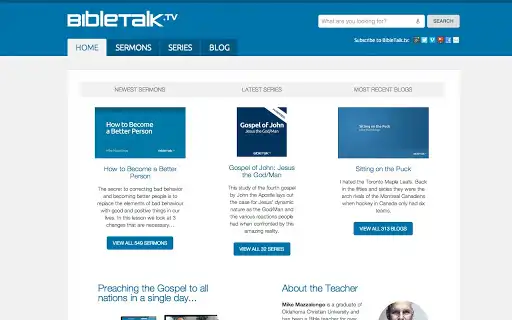
Description
Free Bible Lessons for Teaching & Study
Overview
The software enables users to download and access a comprehensive library of Bible-related content, including text, audio, and video lessons. Designed for Christian educators, pastors, and individuals engaged in personal or group Bible study, the tool supports teaching and preaching by providing structured, faith-based material. Each lesson is grounded in the belief that the Bible is the inspired word of God and centers on the life, nature, and ministry of Jesus Christ. The content is available in multiple formats, ensuring broad accessibility across different devices and learning preferences.
While the developer did not provide additional background information, the software appears to be a dedicated utility for Christian ministry and education. It serves users who need reliable, reusable resources for classroom instruction, sermon preparation, or personal devotion. The platform’s focus on accessibility and format diversity makes it suitable for both digital and in-person teaching environments. The tool is intended to support the mission of spreading biblical knowledge through easily distributable and adaptable content.
Key Features & Capabilities
- Multi-format lesson access – Users can download and use text, audio, and video presentations tailored to various learning styles.
- Wide subject coverage – A diverse range of Bible-related topics is available, supporting both foundational and advanced study.
- Free and unrestricted use – All content can be used for personal study, teaching, preaching, and classroom instruction without licensing fees.
- Device compatibility – Lessons are accessible across multiple platforms, enhancing usability for educators and learners alike.
- Scripture-centered content – Each presentation emphasizes the divine nature and ministry of Jesus Christ, aligning with core Christian teachings.
These features allow users to build customized lesson plans, prepare sermons, or support discipleship programs. For example, a pastor might download a video lesson on grace and use it in a Sunday service, while a Bible study leader could share audio clips with group members. The tool’s flexibility makes it valuable for both formal and informal teaching settings.
User Interface, Workflow & Performance
The interface is designed to support efficient navigation through a large library of content. Users can browse lessons by topic, format, or subject, with a straightforward layout that prioritizes usability. The workflow centers on discovery, selection, and download, allowing users to quickly locate and save materials for offline use.
Performance observations are based on general software behavior patterns. The application is expected to function smoothly on modern Windows and Mac systems, given its 200 MB installation size. The developer did not specify resource usage details, so actual CPU and RAM behavior may vary depending on device specifications and concurrent tasks. Stability is assumed to be consistent with standard desktop applications, though real-world performance data was not provided.
Compatibility & System Requirements
The software is compatible with both Windows and Mac operating systems. It is available in version 1.0 and has an installation size of 200 MB. These details suggest it is designed for mainstream desktop environments with standard hardware configurations.
Exact system requirements were not listed. Compatibility information was partially provided. Users should ensure their devices meet general standards for running desktop applications, including sufficient storage space and up-to-date operating system versions. The tool is intended for use on PCs and Macs, supporting a broad range of users in educational and ministry contexts.
Pros and Cons
Pros
- Free access to a wide variety of Bible lessons in multiple formats
- Content is suitable for teaching, preaching, and personal study
- Designed for easy use across different devices and platforms
- Focus on Scripture-centered, faith-based material
- Lightweight installation size (200 MB)
Cons
- Developer background not publicly available
- No information on specific system requirements beyond OS
- Performance metrics not provided
- Limited details on update frequency or support
- Content availability depends on external website (BibleTalk.tv)
FAQ Section
Is the software free to use?
Yes, the software is completely free. All Bible-related content can be downloaded and used without cost for personal, educational, or ministry purposes.
Which operating systems are supported?
The software is compatible with both Windows and Mac operating systems.
Can I use the downloaded lessons for preaching and teaching?
Yes, all content is intended for use in sermons, Bible classes, personal study, and teaching environments.
Do I need an internet connection to use the downloaded lessons?
Once downloaded, lessons can be accessed offline. However, an initial internet connection is required to download the content.
How often is the software updated?
The release date was November 15, 2023. No information on update frequency was provided by the developer.
Final Thoughts + CTA
This tool stands out as a valuable resource for Christian educators, pastors, and individuals seeking high-quality, faith-based learning materials. Its ability to deliver text, audio, and video lessons in a free, accessible format makes it ideal for both formal and informal teaching settings. With a lightweight footprint and broad compatibility, it offers a practical solution for building lesson plans and supporting spiritual growth.
While some technical and support details are limited, the core functionality is clear and purpose-driven. For those in ministry, education, or personal study, this software provides a reliable foundation for biblical teaching and learning.
Download BibleTalk.tv lessons now and enhance your teaching, preaching, or personal study with trusted, Scripture-centered content.
Guides & Tutorials for BibleTalk.tv App for Chrome
How to install BibleTalk.tv App for Chrome
- Click the Preview / Download button above.
- Once redirected, accept the terms and click Install.
- Wait for the BibleTalk.tv App for Chrome download to finish on your device.
How to use BibleTalk.tv App for Chrome
This software is primarily used for its core features described above. Open the app after installation to explore its capabilities.
User Reviews for BibleTalk.tv App for Chrome 0
No reviews found





